Plan the whole ride,
stop by stop.

Flow places the charging stops, then hands you the controls. Edit the chain on your phone, draft the whole trip in a browser on a laptop, and take the finished route offline before you leave.

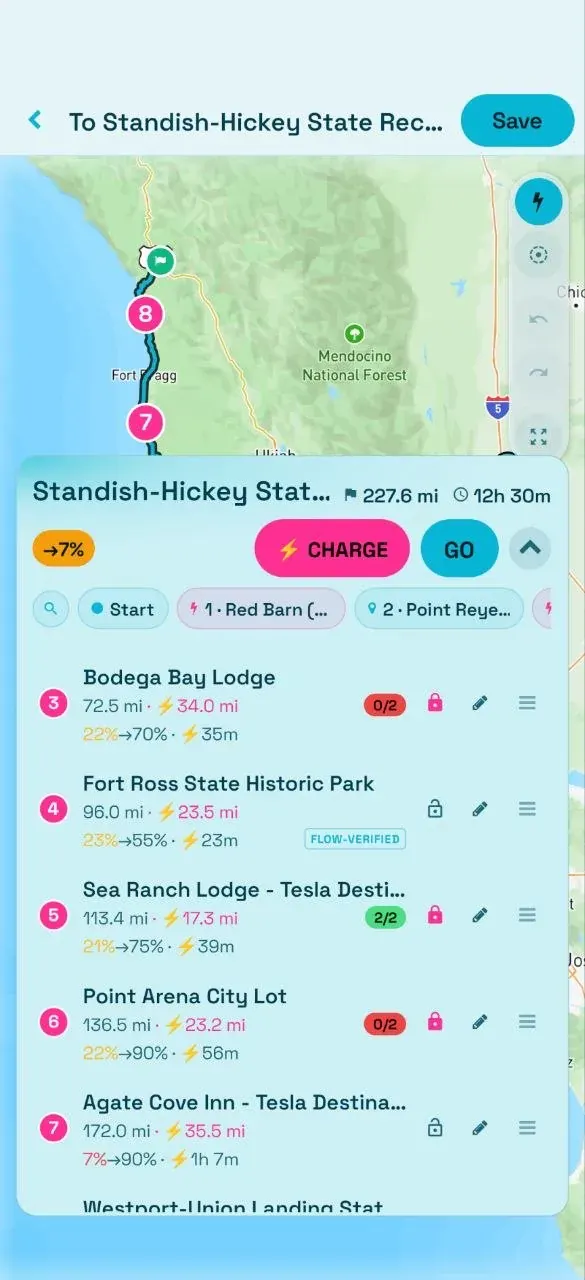
Route Studio — a seven-stop charge chain with arrival and departure battery per stop
Charge

Flow builds the chain.
You edit every stop.

Route Studio is the editor inside the app. Flow builds the charge chain; Studio is where you decide it’s right. Every stop carries three numbers — the battery you arrive on, the battery you leave with, and the minutes you’ll wait there.

Drag a stop to move it. Lock one you know is good. Swap a charger for another nearby, remove a stop, or drop a waypoint anywhere on the map, and the whole chain re-solves around whatever you changed. Chargers other riders have verified are flagged, so a station someone has actually plugged into reads differently from one that only exists in a database.

  • ✓Arrival battery, departure battery and wait minutes on every stop
  • ✓Drag a stop, lock a stop, swap the charger
  • ✓Community-verified chargers flagged
  • ✓The chain re-solves as you edit
Watch the arrival battery

A stop you’d reach on very little is the chain telling you it’s tight. The fix is almost always an earlier stop, not a faster one — add a charger before the thin leg and everything downstream relaxes.

Step by step Building your first charge-aware route, start to finish.

Plan on a big screen.
Ride from your pocket.

Flow Builder is the route planner in a browser. Open it on a laptop or desktop — nothing to install. Click to drop your start, your destination and every point in between, then drag any of them to fine-tune.

Draw it however you think

Drop points and drag them, reorder stops, mark one as a throughpoint the route should pass without a full stop, or sketch a freehand line and let Flow snap it to real roads.

The same routing brain

Between your points it routes on rideable roads, favouring scenic two-lane highways over freeways, exactly the way the app does — and runs the same charge-aware math, with stops placed where you’ll need them and energy costed per leg.

Then it goes to the phone

Adjust your rig’s parameters and watch the plan update. When it looks right, share or open the route and load the link on your phone — turn-by-turn, live telemetry and the charge stops intact.

How Flow picks
the stops.

The chain is built by walking the route. From each position Flow takes the chargers still reachable on the battery you’d have there, scores them on progress made, detour distance, connector tier, time impact and how well the station has actually worked for riders — then takes the best one and repeats until the destination is in reach.

Your safety margin comes off reachable distance before any of that math runs, so reach is the conservative number rather than the optimistic one. Arrival battery counts climb and descent separately: a 300-metre climb costs more than the descent gives back.

  • ✓Reachability computed after the safety margin comes off
  • ✓Climb and descent energy counted separately, never netted
  • ✓A stop is only dropped when Flow can prove it is redundant
  • ✓Coverage gaps surface as a warning with the mileage, not silence
How much you leave with

Departure battery is sized to the legs actually ahead of you, recalculated against the real route once it comes back — not padded to a flat number at every stop. A stop before a long empty stretch fills further; a stop with a short easy hop next doesn’t hold you there for nothing.

The trip decides, not a setting

How tight the chain runs comes from the distance you’re actually covering. A short ride will pass a charger it can provably reach past; a long one keeps the full chain, because out there the next outlet may be an hour away.

The technical account Reachability, the greedy walk, and the white paper behind it.

Save it, take it,
ride it offline.

Tap Save and the route goes to your account — sign in once with a magic link or with Google and it’s in the Routes tab on every device you use. Rename it, edit it, share it or delete it from there.

Download before you leave. Flow offers this automatically for any route over 50 miles: map tiles, turn-by-turn instructions and the chargers along the corridor, cached to the phone. Do it at home over Wi-Fi, not at the trailhead where the signal is already thin. Live charger availability still needs a connection — the map and the route do not.

Plan it once.
The whole group sees it.

A route you’ve planned doesn’t have to stay yours. Load it before you tap Go Live and Flow overlays the planned line on the group map, so riders and anyone watching in a browser can see where the ride is heading — not just where the dots are right now.

Set a route to Public instead and it joins the shared gallery for other riders to study and save. Each one opens in the live viewer at route.pevra.org with the full charge chain, adjustable ride parameters and a GPX export.

Group rides Go Live, share the code, and put the whole crew on one map.
Order matters

Build and load the route first, then tap Go Live. The browser viewer only carries the overlay when the route was loaded before the ride started.

Numbers on every stop 3
Places to plan — phone and browser 2
Offline download auto-offered above 50MI
Export from any shared route GPX

Plan it tonight. Ride it tomorrow.