Just for you.
Or the whole crew.
One rider taps Go Live, everyone else joins with a short code, and the whole group lands on one map with names, battery and speed included. Anyone not riding can watch from a browser. Routes get passed around the same way.
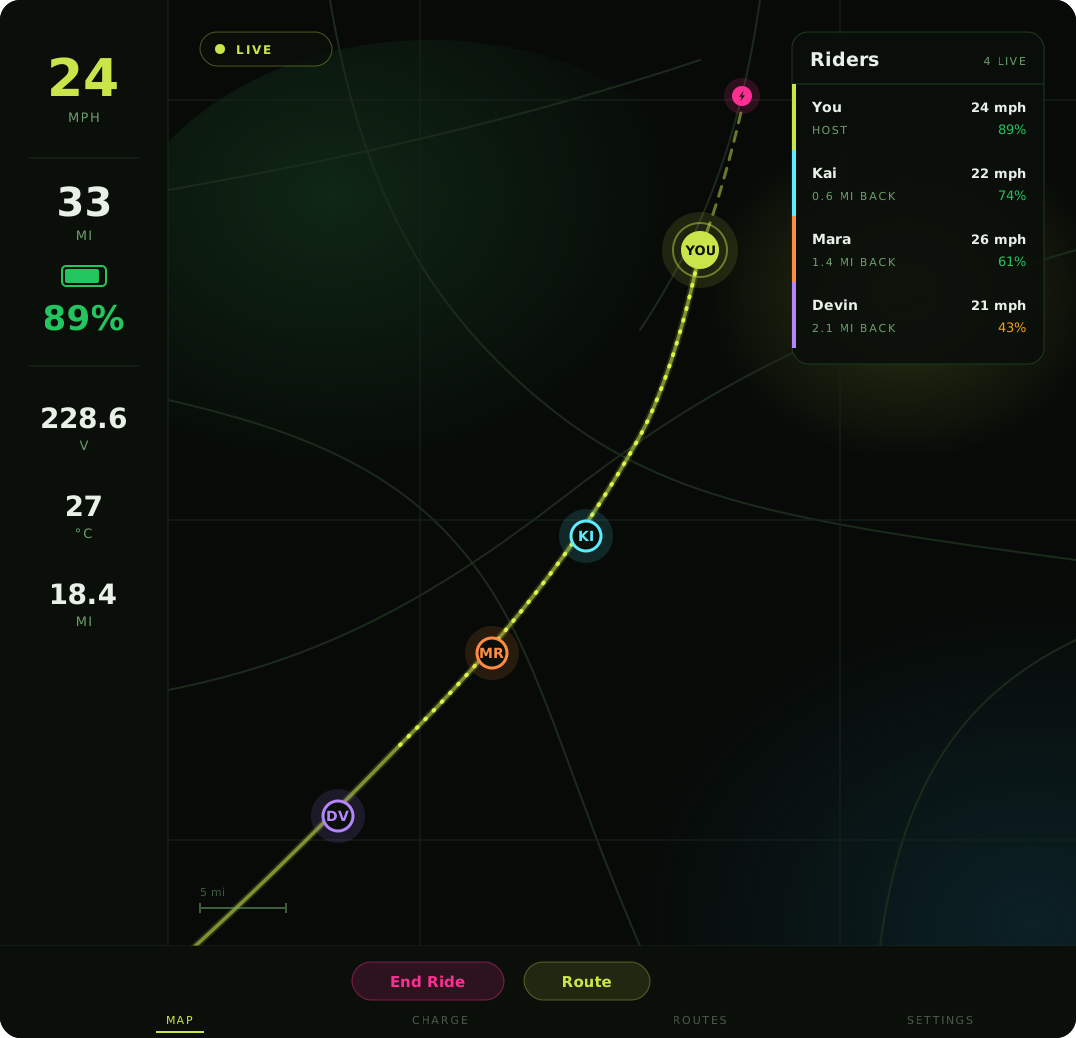
Illustrated. A capture from a real session replaces this once the next group ride is on the books.
Start a ride
in one tap.
Tap Go Live on the main map screen. Flow generates a short ride code and your position starts broadcasting immediately. Share the code by text, shout it out, or hold up the QR code. Your crew taps Join Ride from their own map, types the code, and lands in your group ride. Or they tap a shared link and the app opens straight into the session.
The host ends it for everyone with End Ride. Any rider can step out with Leave Ride, which pulls their position off the group map without ending anything for anyone else.
- ✓Share the code before you split up — signal drops fast once you’re moving
- ✓Join by code, or tap a shared ride link
- ✓Live broadcasting needs mobile data; offline tiles don’t cover it
- Go Live — Flow issues the ride code and starts broadcasting.
- Send the code, or the link, to your crew.
- They tap Join Ride and enter it.
- Everyone appears on one map, in their own color.
- End Ride closes the session for the group.
Everyone on one map,
the whole ride.
Every active rider appears on your map with their avatar and live position, updating continuously as the group moves — so the question stops being “where is everyone” and starts being “are we regrouping at the next stop.”
Alongside each position: that rider’s display name, battery level and speed. The three things you actually want to know about someone half a mile ahead.
Positions update as riders move. If a rider’s dot stops updating they may simply have lost signal — their last position stays on the map until they reconnect or the session ends.
Turn on the breadcrumb trail and your own traveled path draws behind you. It’s off by default — riders switch it on once and it stays on.
Spectate from a laptop.
Nothing to install.
Not everyone on a group ride is on the ride. Share the ride URL and anyone can follow from a browser: live positions on a map, each rider’s path drawn in its own color, and every rider’s name, battery level and speed. Spectators see the same rider data the riders do.
The rider rail carries more than dots — top speed, distance so far, consumption in watt-hours per mile, current speed and state of charge, with the host chipped HOST and a rider whose phone hasn’t sent a position lately marked PAUSED. Alongside it runs a session clock and the group totals.
- ✓Riders live out of riders joined, average speed, combined distance
- ✓Per-rider top speed, distance and Wh per mile
- ✓The planned route too, when one was loaded before the ride started
The spectator page runs in any modern browser on any device — a laptop at home, a phone in a car following the group, a screen at the meet-up point. No account, no app, just the link.
One color each, and it stays that way.
Lime anchors the host. Past six riders the colors recycle, skipping lime, so the host stays unique. Colors are assigned by rider rather than by join order, so someone who loses signal and reconnects comes back the same color instead of swapping mid-ride.
Bring the route with you.
A group ride is easier to follow when everyone can see where it’s going. Build a route before you start the session and Flow overlays that planned line on the group map — riders and spectators alike see where the ride is heading, not just where the dots are right now.
Share the route,
not just the ride.
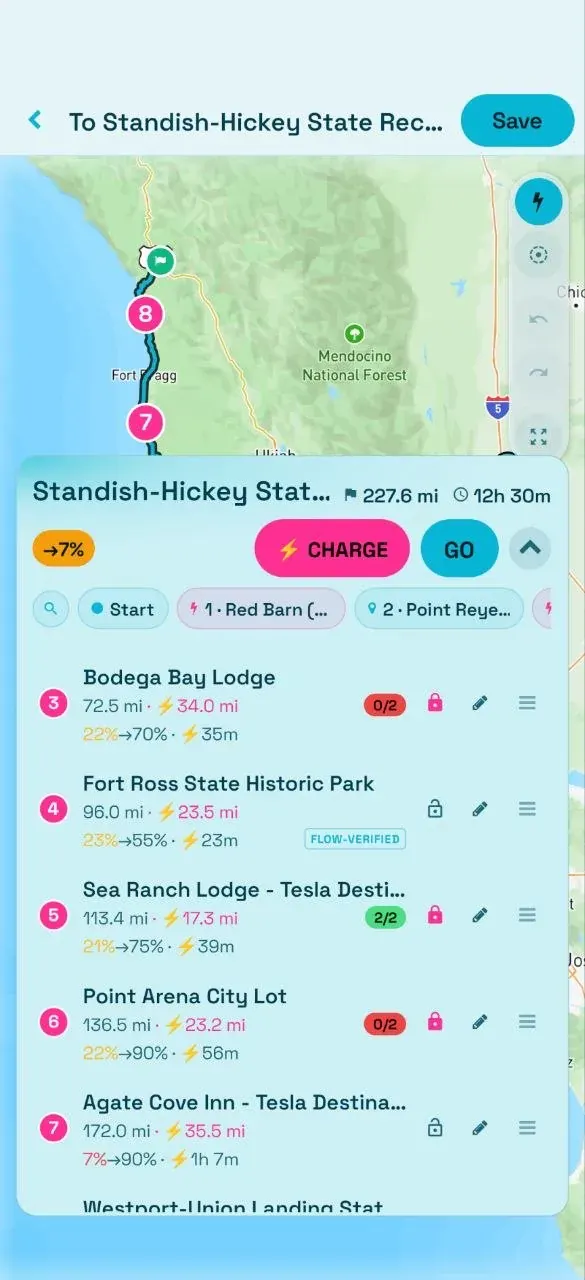
Groups swap routes as much as they swap rides. Plan a charge-aware route in Flow — the app places the charging stops along your path, works out the energy each leg costs, and estimates the time — then set its visibility to Public so other riders can study it and save it.
A shared route opens in the live viewer at route.pevra.org: an interactive page carrying the full charge chain, the distance, the stop count, ride parameters you can adjust to your own rig, and a GPX export if you’d rather take it elsewhere.
- ✓Set a route to Public and it joins the shared gallery
- ✓Full charge chain, distance and stop count in the viewer
- ✓Adjustable ride parameters, and a GPX export
What going live actually shares.
Straight, so you can decide on the real facts. While you are live, your position, display name, battery level and speed are visible to everyone holding the ride link or code — in the app and in a browser alike. Treat going live as broadcasting all four.
Ride data is stored and associated with your account; the privacy policy spells out what is collected and how it is used. So the rule is simple: only share a ride code or link with people you want seeing your location, because anyone holding it can watch the ride live. Leaving the ride takes your position back off the group map.
Get your crew on one map.
Riding with a group that isn’t on Flow yet? The Telegram community is where riders trade routes and arrange meet-ups.